Myth vs Fact: Is FDM the Fastest Additive Manufacturing Technology?
Thursday 30th October 2025
About the Series
Welcome to our Mythbuster series, where we take common “truths” about Additive Manufacturing and put them to the test. There’s a lot of information, and sometimes misinformation, out there about 3D printing. Our goal is to help you understand the reality: what’s best, what’s misunderstood, and what depends on context.
Each instalment looks at a widely held belief about AM and compares it with real-world results based on knowledge and experience of using AM for decades. By breaking down the facts, we aim to demystify 3D printing, helping engineers, operators, and decision-makers make better, faster choices for their applications.
Myth
“FDM is the quickest way to get a 3D printed part.”
Fact (The Short Answer)
Not always.
The short answer is that speed in Additive Manufacturing isn’t just about how long a printer takes to run, it’s about how quickly you can get a finished, usable part in your hands, and it will be influenced by a number of factors including part geometry, quality, material, technology reliability and quantity of parts required.
We set out to test this myth by printing the same model - a small duck (we named him Danny Duck). We have selected three of the most accessible AM technologies: FDM, SLA, and SLS. Whilst Danny Duck is a light-hearted model (who also became our office pet), the model is ideal for showing how each process handles geometry, supports, and throughput in the real world.
❓ What Does “Fast” Actually Mean in 3D Printing?
It’s easy to look at a print time on-screen and assume that’s how long it takes to get your part. But the real measure of speed includes everything from setup and print prep, to post-processing, cleaning, and in some cases, curing.
- FDM
Fused Deposition Modelling, also known as FFF (Fused Filament Fabrication). FDM prints layer-by-layer by heating and extruding filament through a nozzle. Each part is printed individually. Support material needs to be removed post-print.
- SLA
Stereolithography is a form of VAT polymerisation (resin printing). In this instance we are using a form of masked SLA technology. A liquid photopolymer resin is dispensed into a vat. A light source cures the resin according to the design. The system cures entire layers at once. Post-print, parts need washing, supports removed and UV curing.
- SLS
Selective Laser Sintering is a powder fusion form of Additive Manufacturing. A fine layer of powder material is spread across the build platform within a chamber, and a laser selectively fuses the powder particles in the desired pattern. A single build takes longer but needs less hands-on time and produces many parts in one go. Post-print, loose powder has to be removed. There are no supports to remove.
So “fastest” depends on whether you’re printing one prototype or a full batch of production parts.
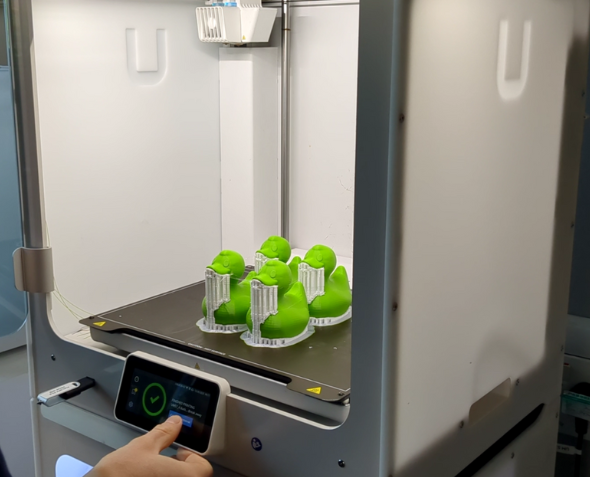
Ducks printed on the UltiMaker FDM printer
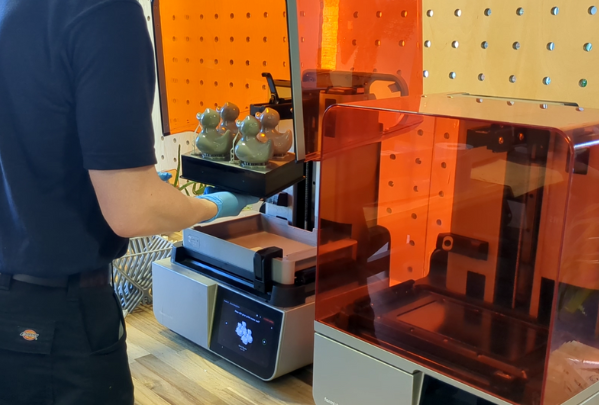
Ducks printed on the Formlabs Form 4 resin printer
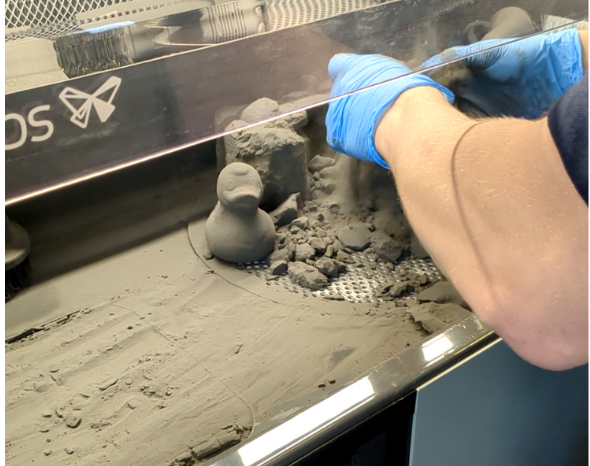
Ducks printed on the Formlabs Fuse 1+ 30W SLS system
❓ How Did We Test Speed?
We printed the same Danny Duck model (dimensions 61 × 91 × 92 mm) on each system, using standard settings and comparable materials.
Results of a single duck:
Here SLA is the fastest overall production time, with the shortest print time.
Results of 4 ducks:
Once again, SLA had the fastest overall production time, with the shortest print time.
We then ran larger batches of 15 ducks:
Once again, SLA had the fastest overall production time, with the shortest print time. At this quantity, FDM becomes the slowest form of AM, but at a similar cost to both SLA and SLS.
If batch quantities were to increase further, SLS would become the overall fastest production and print time per part quantity.
❓ What Factors Affect 3D Print Speed?
There are several variables that can make a big difference in total time and cost.
1. Material Type
Different materials need different settings, and not all AM technologies can print all materials.
Material properties will affect the speed at which the machine can print. For instance, flexible materials such as TPU on an FDM printer or rubber or silicone type materials in resin printing will print slower.
2. Geometry and Orientation
Overhangs and complex geometries will slow down FDM and SLA printing because they require supports. The orientation of your model is really important here. Good orientation will deliver both excellent surface quality and reduce the amount of supports required, saving both print time and material costs.
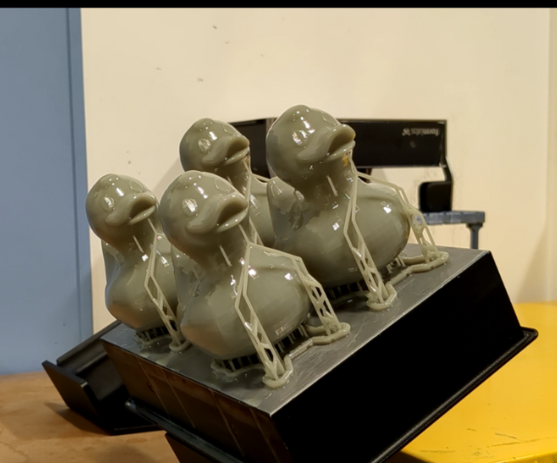
For Danny Duck, the beak and underbelly were the main culprits, both added print time and post-processing time.
In SLS, no supports are needed. The bed of powder acts as support during the print process, so there is nothing to remove post-print.
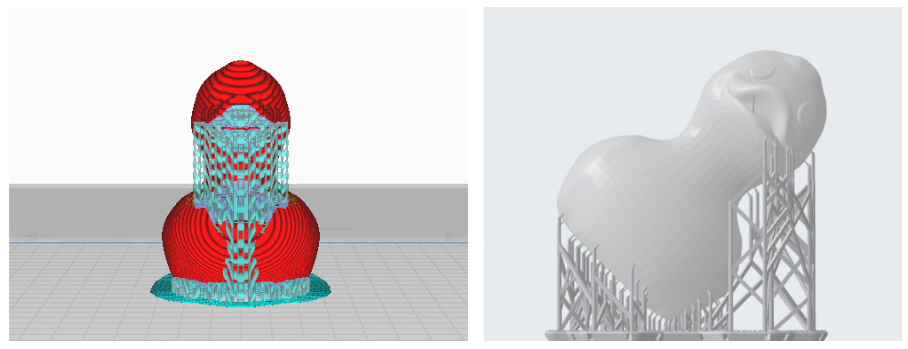
The red duck shows supports on FDM printer. The grey duck shows supports on the SLA/resin printer.
3. Part Density
FDM allows you to change the infill percentage (how “full” the internal build of a part is). Higher infill will result in a denser and heavier part, but it will take longer to print and use more material. In most cases, there is little benefit to maxing out the infill.
For example, 15% infill prints in 5 h 18 min. A 50% infill for the same part prints in 6 h 43 mins, adding more than an hour additional print time.
SLA and SLS don’t use infill in the same way as they print solid, but you can hollow parts to save material, just remember to include drainage holes.
4. Number of Parts
This is where perceptions of speed flip.
In FDM, print time increases linearly, i.e. print more parts, you wait longer. That is because there are no economies of time when printing multiple parts on a bed. If 1 part takes 2 hours, 2 parts will take 4 hours.
In SLA and SLS, you really benefit from printing multiple parts in a single build. That’s due to the technologies ability to build across a single build layer, rather than part by part. The time increase is marginal, making these technologies far more efficient for production runs.
5. Printer Reliability and Repeatability
Speed isn’t much use if your print fails halfway through.
Reliability is one of the biggest and often overlooked factors in how long it takes to produce a part.
While many entry-level printers can deliver good results, industrial Additive Manufacturing systems are designed for consistency and uptime. They’re built to run day after day with minimal user intervention, providing consistent, reliable and repeatable prints.
That means issues like warping, poor adhesion, stringing or “spaghetti” prints, common headaches in hobbyist or consumer-level printers, simply aren’t part of the equation.
Industrial systems get the job done, reliably and predictably with faster turnaround and higher productivity. Repeatable quality removes the need to reprint, saving valuable time and money.
Reliability might not show up in a print time estimate, but it has a huge impact on real-world speed, because the fastest printer is the one that finishes perfectly the first time.
❓ How Does Post-Processing Change the Equation?
It’s often the hidden time cost.
- FDM – Removing supports can be fiddly and risks damaging the part. Parts are usable straight away once cooled, but clean-up can be slow.
- Masked SLA – Requires washing, support removal, and UV curing — 15–30 minutes per part depending on geometry.
- SLS – Parts emerge from the powder bed with no supports. De-powdering is mostly automated and quick. Parts can then be further tumbled or polished using automated systems.
When total production time is measured from “print start” to “part ready for use,” SLS frequently outpaces both SLA and FDM, particularly for larger batches.
Masked SLA ducks after being washed in IPA
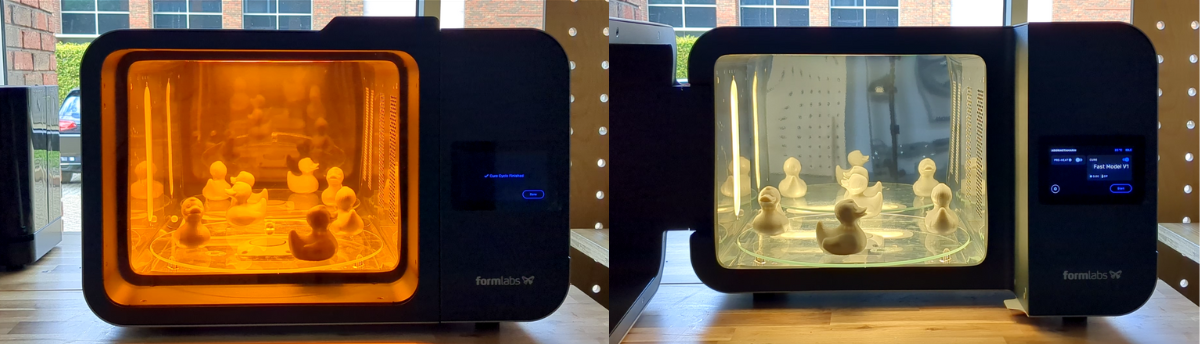
Masked SLA ducks in the Form Cure L system (for heat and UV cure)
❓ Can You Print Faster Without Losing Quality?
Sometimes, but it’s a balancing act.
Speed settings that are too aggressive can compromise layer adhesion, accuracy, and surface finish.
We deliberately printed one FDM part at maximum speed. In our FDM test, the “fast” mode print reduced time by 40% but introduced visible banding and rougher surfaces.
In other technologies, such as SLA, some materials are specifically designed to be printed faster, such as Fast Model and Draft resins, perfectly.
So, while “fast mode” might work for visual mock-ups, it’s rarely the right choice for functional components.
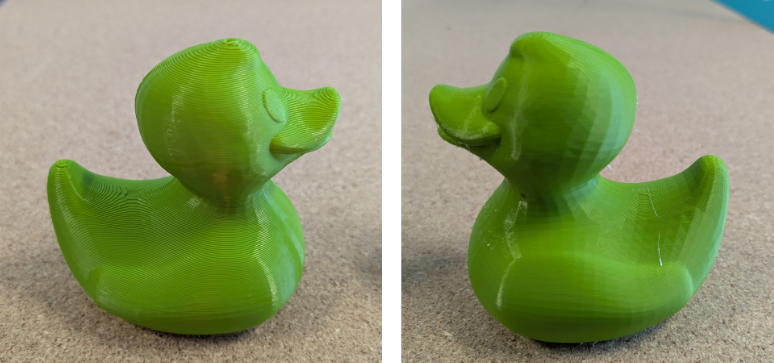
Duck printed at maximum speed on FDM printer - with more visible layer lines and poorer surface quality.
Duck printed at standard speed on FDM printer - with a smoother surface finish.
❓ How Do You Choose the Right Technology for Your Application?
Every project is different, but here are some key takeaways to help narrow it down:
- For quick, low-cost prototypes or one-off parts:
FDM is still the go-to for accessibility, lowest cost and speed to first part. There are also specialist FDM machines that use engineering-grade materials that produce strong, functional parts that cannot be printed any other way, such as Markforged printers that print in Nylon with continuous reinforcing Carbon Fibre.
- For detailed or aesthetic parts:
SLA delivers faster prints with high resolution, accuracy and surface quality. Ideal for one-off high-quality prototypes, through to functional tooling and low volume quantities
- For batch production and functional parts:
SLS wins on total throughput and low labour, even if the printer runs longer per build. Ideal for higher volume quantity of parts
- For specialist materials:
use the AM technology best matched to the material.
Or, simply put, as a starting guide:
✅ FDM is fast to prototype.
✅ SLA is fast to print.
✅ SLS is fast to produce.
Final Thoughts: What’s the Fastest AM Technology, Really?
There’s no single answer, only context. Sorry to disappoint!
If you’re printing one part, FDM might feel fastest, and it is often the cheapest. But if you’re measuring total productivity, how long it takes to go from digital design to usable part, then SLA and SLS frequently come out ahead.
The conclusion is that speed isn’t just about layers per second. It’s about the whole workflow, and that’s where understanding the right technology, with the right material, matched to the right application, makes all the difference.
Ready to see how Additive Manufacturing could benefit your business?
Whether you’re looking to bring 3D printing in-house or explore the best technology for your workflow, our team can help you find the right fit.
👉
Talk to our Applications Team to discuss your project or request a sample print.